
CSA: What Administering a Platform Teaches You
/ 7 min read
Table of Contents
I was standing in the middle of a construction site explaining paint chemistry to a skeptical painter when I decided I needed to stop being only a marketer.
Not because marketing was wrong. Because it was incomplete.
I had spent years understanding people — what they want, why they resist, how trust is built in sixty seconds or less. I had worked in email campaigns, SEO, industrial sales, stakeholder management. But every time a conversation touched technology — how a business process could be automated, how data could flow between departments, how an organization could stop running on spreadsheets and gut instinct — I was nodding along while quietly calculating how fast I could change the subject.
That had to change.
I was Assistant Manager Marketing at Maple Leaf Cement when I started looking seriously at ServiceNow. Not because someone told me to. Because I kept bumping into a gap — between the strategy conversations happening at the top and the operational chaos happening everywhere else. Someone needed to sit in the middle of that gap and translate. I wanted to be that person. And that person, I was increasingly convinced, needed to understand platforms — not just campaigns.
ServiceNow was the rabbit hole I chose. The CSA was the door.
What I Walked In With
I want to be honest about my starting point because it matters for anyone reading this from a similar background.
I had never touched an enterprise platform. Not SAP. Not Salesforce. Not Jira. My technical fluency was in marketing tools — Ahrefs, Moosend, ClickUp, Slack, Zoho Books. Platforms that feel designed to be picked up quickly, that reward intuition, that have friendly UIs and forgiving learning curves.
ServiceNow is not that.
When I first logged into my Personal Developer Instance I did not feel lost exactly. I felt like someone had handed me the controls of something very large and very serious and was watching to see what I would do. The platform has opinions. It has architecture. It has a logic that runs underneath everything — and until you understand that logic, the interface feels like a very organized maze.
What kept me going was not discipline. It was curiosity. I love platforms. I love businesses. I love the way technology, when it is actually working, makes organizations function like they were designed by someone who understood human beings. ServiceNow, at first glance, felt like it might be that. I wanted to know if I was right.
I was right. But it took a month to understand why.
Step 1 — Get Your PDI
The single most important thing I can tell you about studying for CSA: do not study without a Personal Developer Instance.
Go to developer.servicenow.com, create a free account, and request an instance. No credit card. No catch.
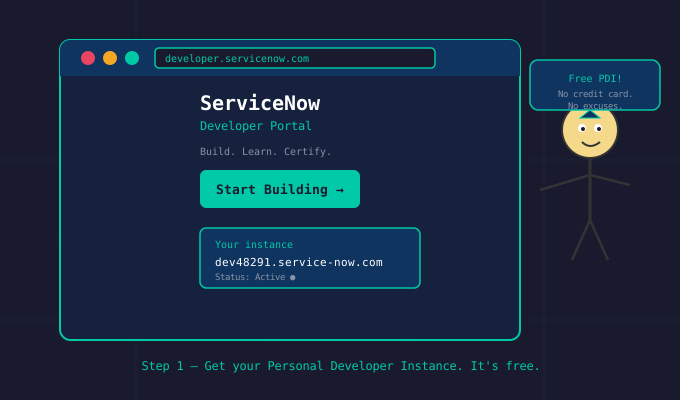
Once provisioned your instance URL looks like https://devXXXXX.service-now.com. This is your sandbox. Break things here. Reset and try again. Nothing you do affects anyone else.
Step 2 — Learn the Navigator
There is a specific moment I remember when the platform stopped feeling like a foreign language.
I was navigating through user management — roles, groups, departments, access controls — and I suddenly saw it. Not the software. The organization.
Here was a company’s entire structure, mapped onto a screen. Who reports to whom. What each person can see and cannot see. Which applications are available to which roles. How data flows from one department to another.
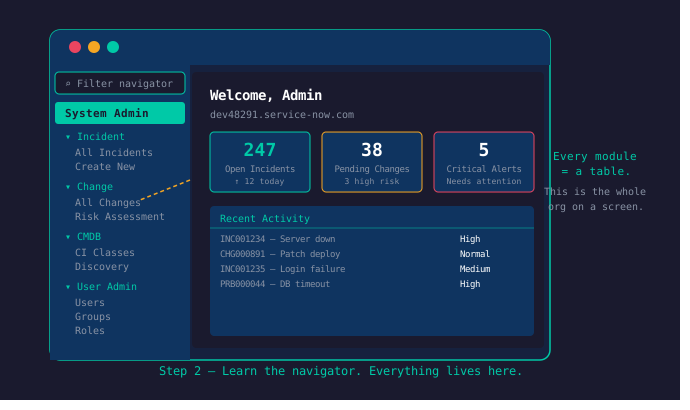
Every module in the left navigator is a filtered view of a table. Once that clicks, the rest of the platform makes sense structurally.
My colleague Saad helped me understand this. He has a computer science background and spent hours walking me through the CS vocabulary the documentation assumed you already had. Data structures. Table relationships. The logic of how systems store and retrieve information. Those sessions compressed weeks of confusion into days of clarity.
If you are coming from a non-technical background, find your Saad. This is not optional advice.
Step 3 — Build Real Things with Flow Designer
Do not just follow documentation steps. Pick a real business scenario and build it end to end. The Flow Designer is where automation lives — no code required, just logic.
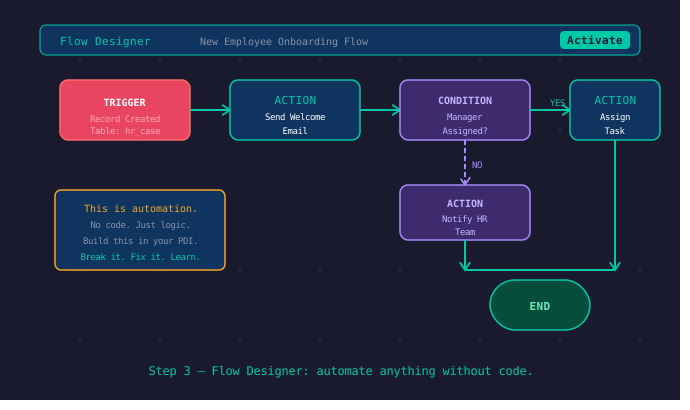
Configure the forms, set up the workflows, assign roles, test access. Learning by building is the only method that produces knowledge you can actually use.
Step 4 — Double Your Time on ACLs
Two things gave me the most trouble. The data model — specifically the CMDB and how tangible and non-tangible assets are structured. And security.
ACLs — Access Control Lists — are how ServiceNow decides who can see what. The logic is powerful but the relationships between roles, groups, and record-level permissions are non-trivial.
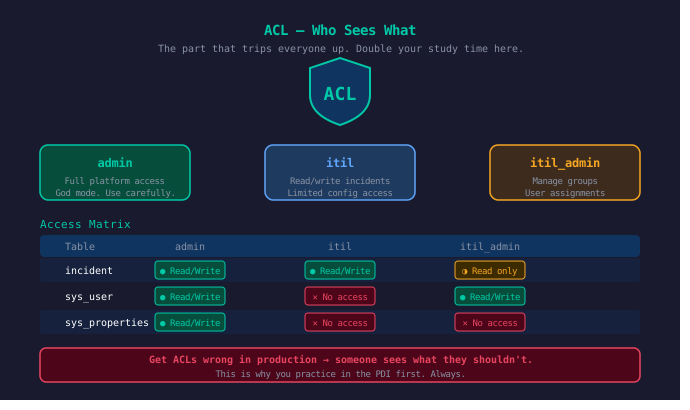
Getting ACLs wrong in a live environment has real consequences. Someone sees something they should not, or cannot access something they need. That weight is worth sitting with during the study phase.
The Bigger Picture — One Org on One Screen
Here is the mistake I made early. I initially approached the platform as a tool with a set of pre-loaded features. As if my job was to learn what the buttons do.
That is completely the wrong frame.
ServiceNow is a canvas. A blank organizational canvas where you can draw — configure, automate, connect, brand — your entire company.
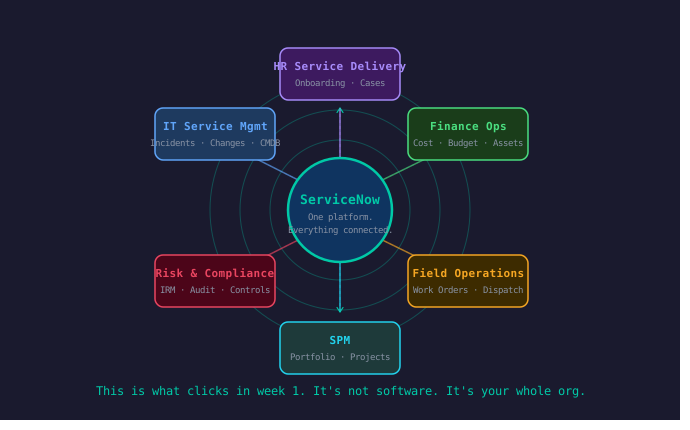
Every process that can be drawn on paper can be built inside it. Every workflow that lives in someone’s head can be mapped to a table and automated. When I understood that, studying became a fundamentally different activity. I stopped memorizing features and started asking — what would a real organization need to build here, and how would I build it?
The 4-Week Study Roadmap
Week 1 — Foundation. Platform orientation, navigation, tables and records, basic data model, forms and lists, user administration.
Week 2 — Configuration. Notifications, UI policies, business rules, client scripts, service catalog basics, workflows and Flow Designer introduction.
Week 3 — Security and Access. ACLs, roles, groups, record-level security, data policies, audit logs. Spend double time here.
Week 4 — Integration and Review. Import sets, transform maps, REST/SOAP overview, scheduled jobs, reporting and dashboards, full platform review.
Exam at the end of week four if you have been consistent. One month if you want genuine fluency rather than just a passing score.
What the Certification Actually Gives You
I passed CSA and felt something I did not expect.
Not relief. Excitement.
Because CSA is not the destination. It is the credential that opens the next door. For me that door was Strategic Portfolio Management — the domain where my years in marketing, sales, and stakeholder management finally had a technical home.
CSA taught me to see organizations the way the platform sees them — as a collection of interconnected processes, roles, data flows, and decisions that can all be made visible, automated, and improved.
The painter on the construction site had a question no one had bothered to answer clearly. The platform user in an organization has the same problem. Someone needs to understand both the technology and the human being using it.
That is what this certification trains you for. Whether or not you ever write a single line of code.
Next: SPM — where change management turns out to be ninety percent therapy.